Custom Search
|
|
 
|
||
|
COMMUNICATIONS WITH REMOTE TERMINALS The ability to connect to the LAN through the use of remote terminals gives you great flexibility, whether it is being able to check your E-mail via a modem or check the status of the LAN by connecting to the network as a
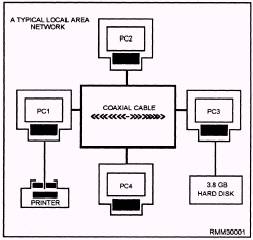
Figure 1-1.\Connecting PCs to form a local area network. remote console. The remote capabilities will increase productivity. The network supervisor can manage the system by establishing communications through a remote terminal. Logins from Remote Locations Remote access refers to logins from remote locations. These login procedures are accomplished by dialing into an access server (a special modem or computer) and logging in through this server. The network modems that can be used as remote access servers must have a network interface card (NIC) compatible with the network to which the modem is providing access. Remote connections often require special timing considerations, because many network transactions must happen within a very limited time period. Remote Console A networking utility that enables a network supervisor to manage a server from a workstation or from a remote location using a modem. The supervisor can give commands and accomplish tasks just as if all the commands were being given directly at the server by simulating a direct connection to the server. NETWORK STARTUP/SHUTDOWN Keeping the system running is the most visible aspect of system administration. You're the one they will call when the system has gone down (crashed). We will discuss the normal UNIX booting (startup) and shutdown processes. Shutting down and bringing up a UNIX system is actually very simple. System Startup Every time the system is booted, a series of steps must be performed before the system becomes available to users. Booting is the process of bringing a computer system up and making it ready to use. The process begins when some instructions stored in ROM are executed which load the program boot from the boot partition into system memory. Boot loads the bootable operating system, which is also called the bootable kernel. The bootable kernel starts the init (initialization) program. INIT.\ One of the first things init does is check available memory, Next, it checks out the environment to see what hardware is present. When the kernel is configured, it is told what types of hardware devices to expect. Init will search for and attempt to initialize each physically attached device. Any device that does not initialize or that is missing will be marked as nonexistent and the driver disabled. Even if the device is later reconnected, it will be unusable until the system is rebooted. When all is ready, the kernel verifies the integrity of the root filesystem and then mounts it. Init does the rest of the work that is needed in preparing the system for users. This includes mounting the remaining local disk partitions (those found in the file /etc/checklist); performing some filesystem cleanup operations (fsck); turning on the major UNIX subsystems, such as accounting and the print service; starting the network; mounting remote file systems; and enabling user logins. |
||
|
||